Table of Contents
To create a new form:
- Go to your event’s Control Panel
- Click the Call for Papers (CFP) Portal button
- Click Create New Form and save your speaker form
Note: When syncing with Sched, any session with an empty Session Title field (e.g., if it was not required or was deleted in the CFP form) will not be synced to Sched.
To duplicate an existing form:
- Go to your event’s Control Panel
- Click the Call for Papers (CFP) Portal button
- Select the form you want to duplicate
- Click the three dots icon in the top right corner
- Select Duplicate
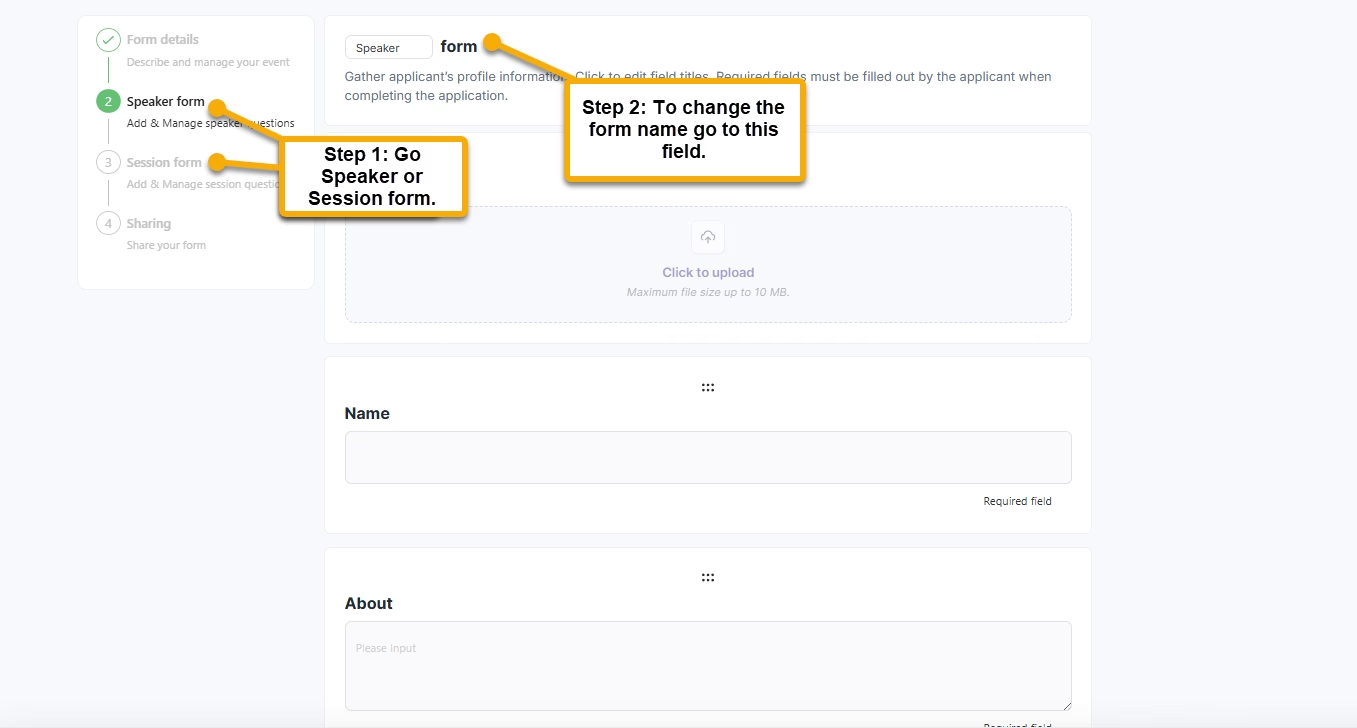
Rename a Form (Speaker or Session) #
You can now change the Speaker Form and Session Form names directly within your event setup. Steps to Rename a Form
- Open the form.
- Locate the Form Name field.
- Enter the new name.
- Save your changes.